
Pronocast at a glance
Pronocast is a web app, free during the beta, that computes before every tennis match each player’s win probability and the most likely set score. It covers the ATP, the WTA and the Challenger tours, in singles and doubles, publishes the predictions before the match, then compares them with the real result.
- What you get: a probability for each player, the likely set score, live tracking, alerts.
- What it is worth: 69.1% correct winners in testing, across 37,104 singles matches the model had never seen.
- What it costs: nothing during the beta, no credit card.
- What it is not: betting advice. Pronocast takes no bets.
Without an account, you can read the public prediction pages, each match’s context (favourite, odds, head-to-head) and, after the match, the published prediction with its verdict, on the match page and in the verified results. With an account, you add probabilities and scores before the match, live tracking, picks, filters and alerts.
Get started in three minutes
Creating an account takes a minute: an email address and a password (8 characters minimum, with a confirmation email), or “Continue with Google”. You need to accept the terms of use.
- Create your free account. You land on the “Upcoming predictions” page.
- Pick your language in Profile (“Language · Langue”). It applies to the app and to the emails, and it is saved on your account.
- Install the app. It then opens full screen, like a native app, on the Picks page.
Installing the app
A drawn tutorial, with the button to tap circled in green at every step, is on the install the Pronocast app page. In short:
- iPhone, Safari: tap Share, then “Add to Home Screen”.
- Android, Chrome: the ⋮ menu, then “Install Pronocast”, or the “Install the app” button in Profile.
- Desktop, Chrome or Edge: the install icon in the address bar, or “Install the app” in the side menu.
- Safari on Mac: File menu, then “Add to Dock”.
Installing also matters for alerts: on iPhone, Safari only allows web notifications once the app has been added to the home screen.
How to read a prediction
A Pronocast prediction is a win probability for each player. A favourite at 63% is not “sure to win”: they would win about six comparable matches out of ten. That is the value to read, more than the favourite’s name.
The match card
Each match is a card: tournament, round, time, surface, both players with their flag and Elo, and a probability bar to one decimal (for example 63.4%). The favourite is ringed in green, their name in bold. Under the bar you find the odds (on the Upcoming and Picks pages) and “Predicted score: 2-0”, with that score’s probability. Once the match is played, the card shows the winner and a “correct” or “missed” badge.
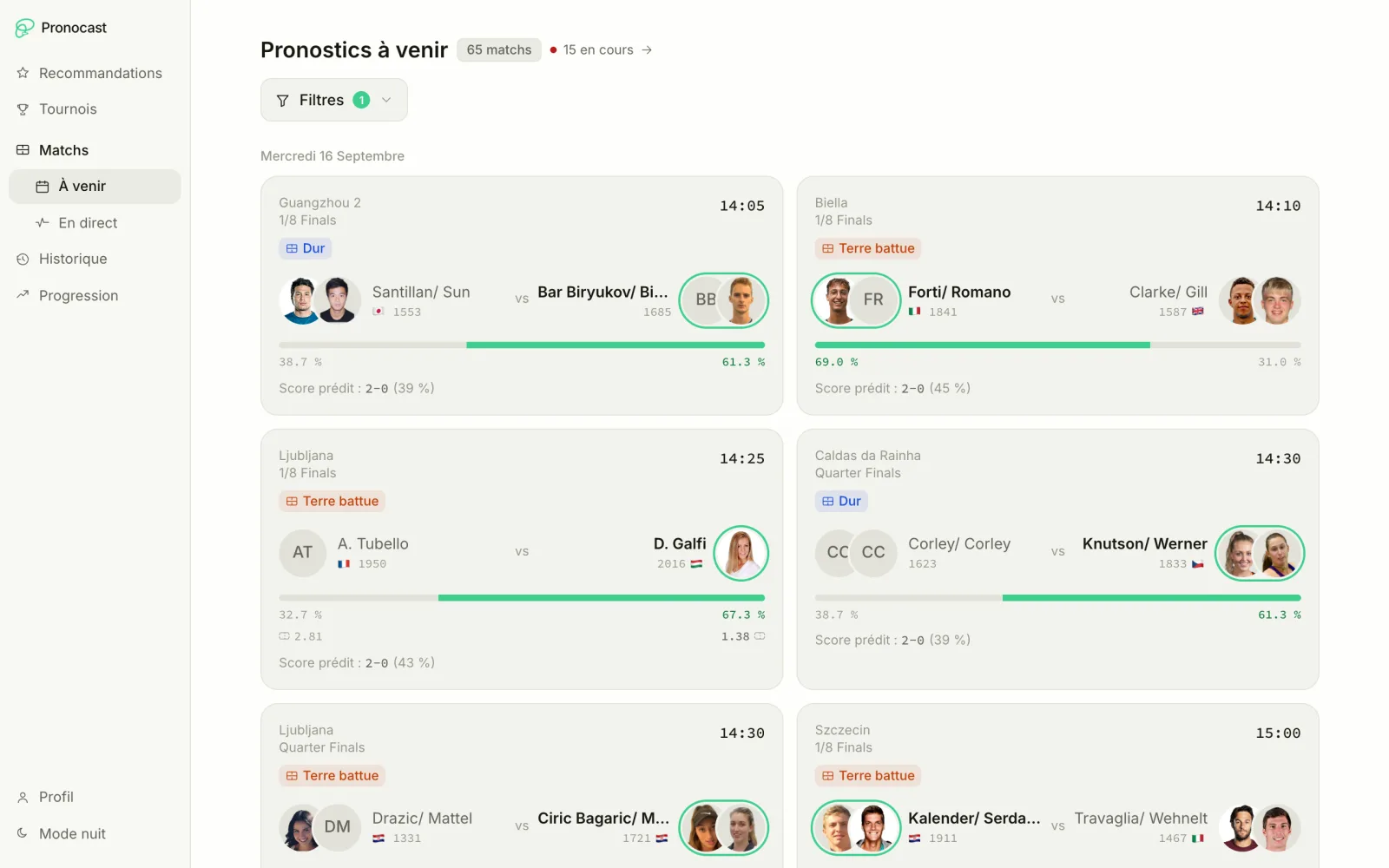
Elo is a strength rating: the bigger the gap between two players, the further the probability moves from 50%.
The detail view
A click on a card opens it. In order:
- Model prediction: a “Pre-match” gauge (and “Live” if the match is in progress), a reading sentence and the predicted set score. The sentence follows the favourite’s probability: under 55%, “Very open match”; 55 to 62%, a slight edge; 62 to 70%, a clear edge; from 70%, a strong favourite.
- Head to head (singles only): the archived record since 2020, the record on today’s surface, a timeline of the meetings (colour shows the surface) and the last four meetings.
- What the model looks at: Elo, surface Elo, form over the last ten matches and matches played in 14 days (fatigue: fewer is better). Criteria in green back the prediction, with a summary such as “Sinner leads on 3 of the 4 criteria”.
- Career comparison: results by season, by surface (from 5 matches) and recent form.
In doubles there are no odds (the data source does not provide them), no head-to-head and no player profile. The head-to-head matters less than people think: read it as context, not as a verdict.
Upcoming matches and filters
“Upcoming predictions” lists every match of today and the following days, grouped by day then by tournament. Each tournament is a drawer, closed by default; it opens by itself when a player or tournament filter is active. A match drops off the list once its scheduled time is more than four hours past.
The “Card view” or “Table view” button changes the display (table columns: match, round, time, prediction, sets, odds). Your choice is remembered for each page.
Filters
- Search a player…: by name.
- Day, category, tournament, surface: several values at once.
- Confidence: from 50, 60, 70, 80 or 90%.
- Categories: ATP, WTA, Challenger men and women, and their doubles.
- Surfaces: hard, clay, grass.
Category, surface and confidence are remembered from one visit to the next: if a list looks empty, check the badge on the “Filters” button, then “Reset filters” (it also clears that memory). Day, tournament and player are never remembered.
Saved filters
On the Upcoming, Live, Picks and History pages, “My filters” stores the active combination under a name (one name per page). The star (“Set as default”) applies it automatically whenever you arrive on the page without any filter in the address. Example: “ATP on hard courts, confidence 70% or more”.
Picks
“High-confidence matches” gathers the upcoming matches where the favourite’s probability is at least 70%. That is the threshold from which the measured accuracy exceeds 80%. There are ten matches at most: if more reach the threshold, the choice of ten takes the odds into account when they exist, and the list is shown by start time.
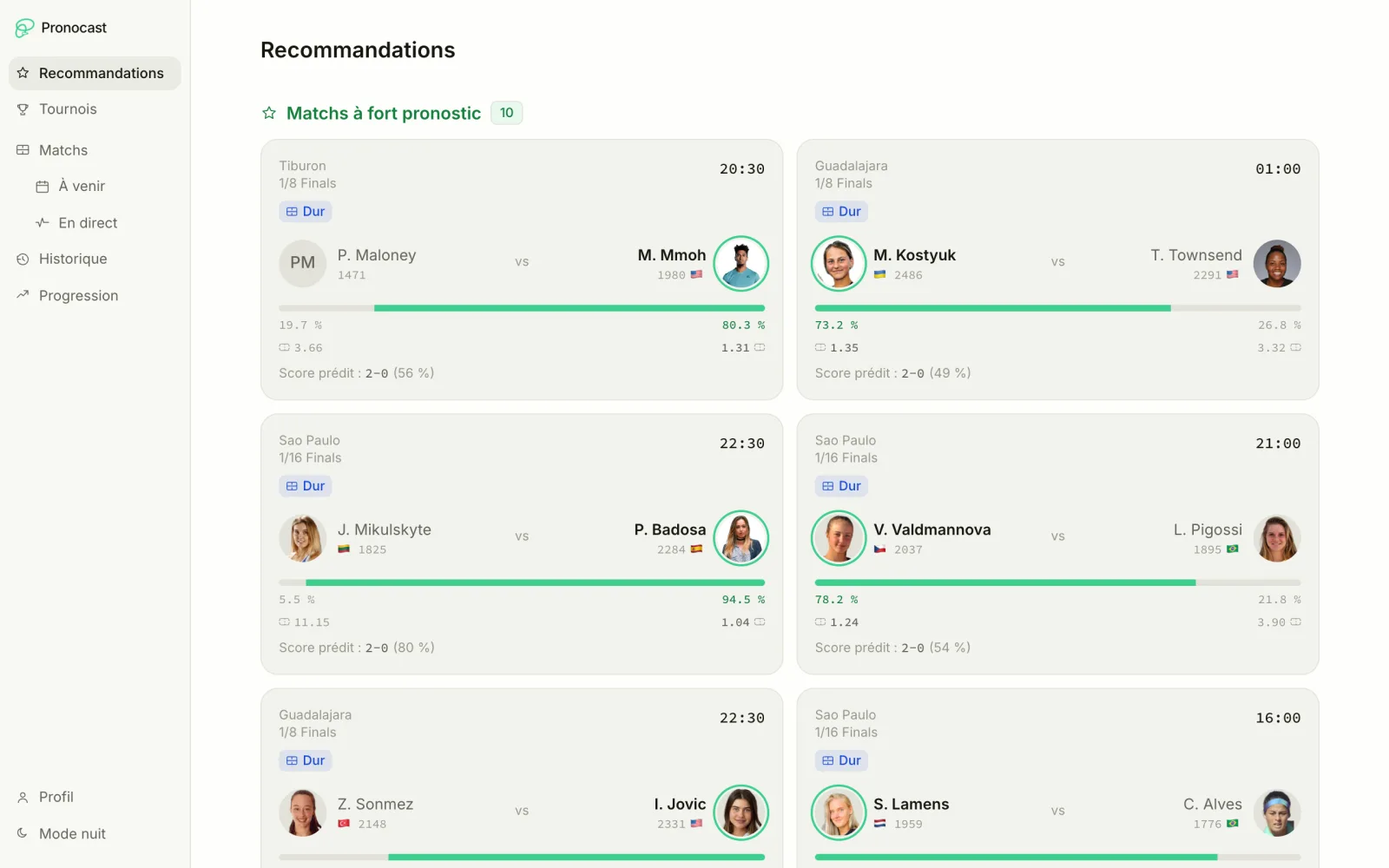
The confidence filter can only raise that 70% floor. Below, the “Tournaments with a strong track record” section highlights the ongoing tournaments where at least 5 predictions already have a result and at least 70% were right; those with at least 8 results come first, because a small sample is hard to tell from chance.
These are the matches where the model is most confident, not bets to place: a favourite at 75% still loses one match in four.
Live tracking
“Live” shows matches in progress with the score, the server and a win probability recalculated as the match goes on. The page reloads by itself every 30 seconds (paused while the tab is hidden), and the server updates scores and probabilities every minute. The “updated … s ago” indicator tells you where you stand.
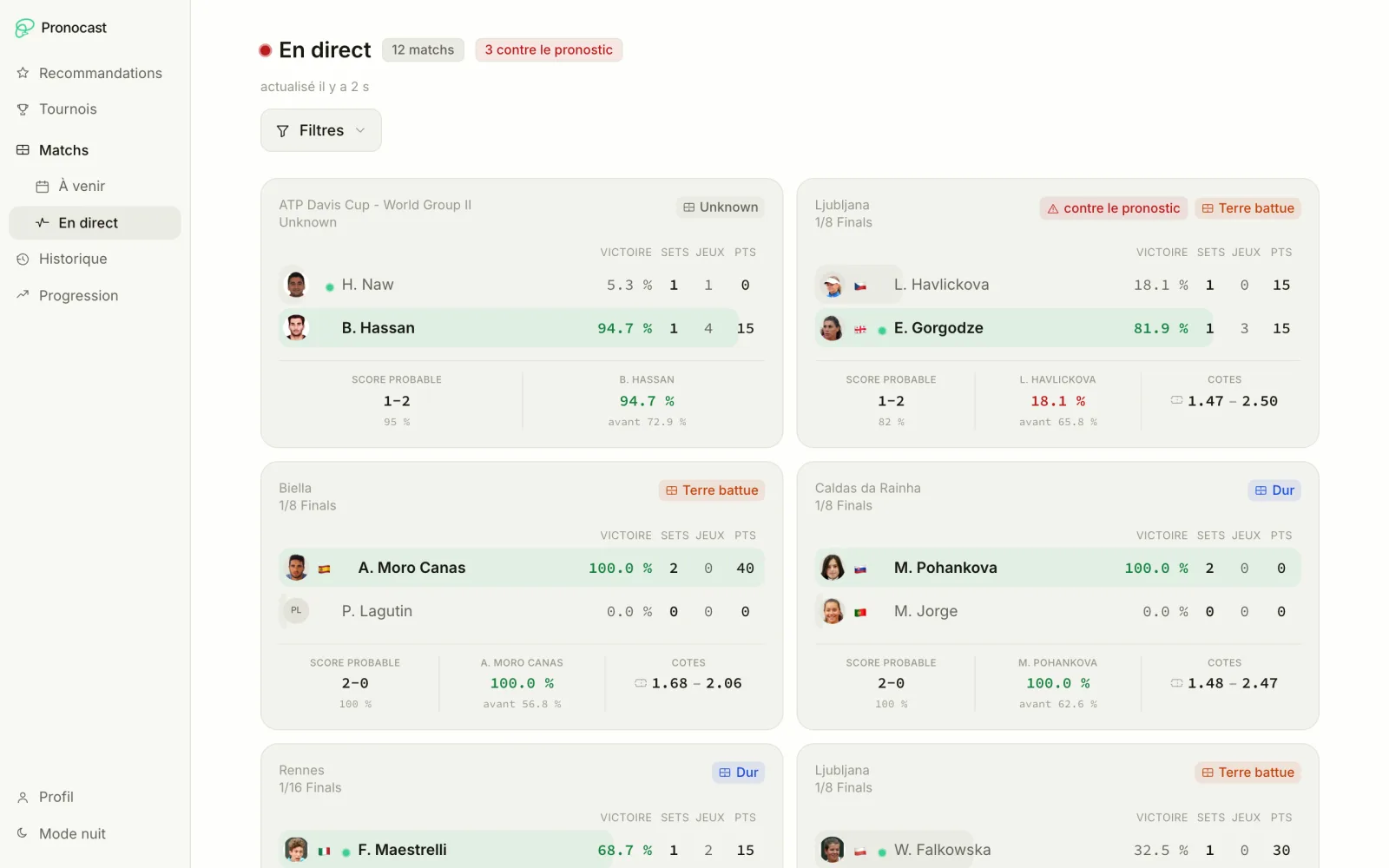
- Each card shows sets, games and points, the favourite’s live probability with the “before” pre-match value, the “Likely score” and the odds.
- A red “against the prediction” badge counts the matches where the pre-match favourite has dropped below 50%.
- The “Suspended and stopped” section keeps interrupted matches (rain, retirement, walkover) for a few hours, in case play resumes.
- Filters and saved filters work here too, except the day and the tournament.
Alerts
Alerts send a notification to your device when a match goes past the confidence threshold you chose. They are set in Profile, with the “Enable notifications” button.
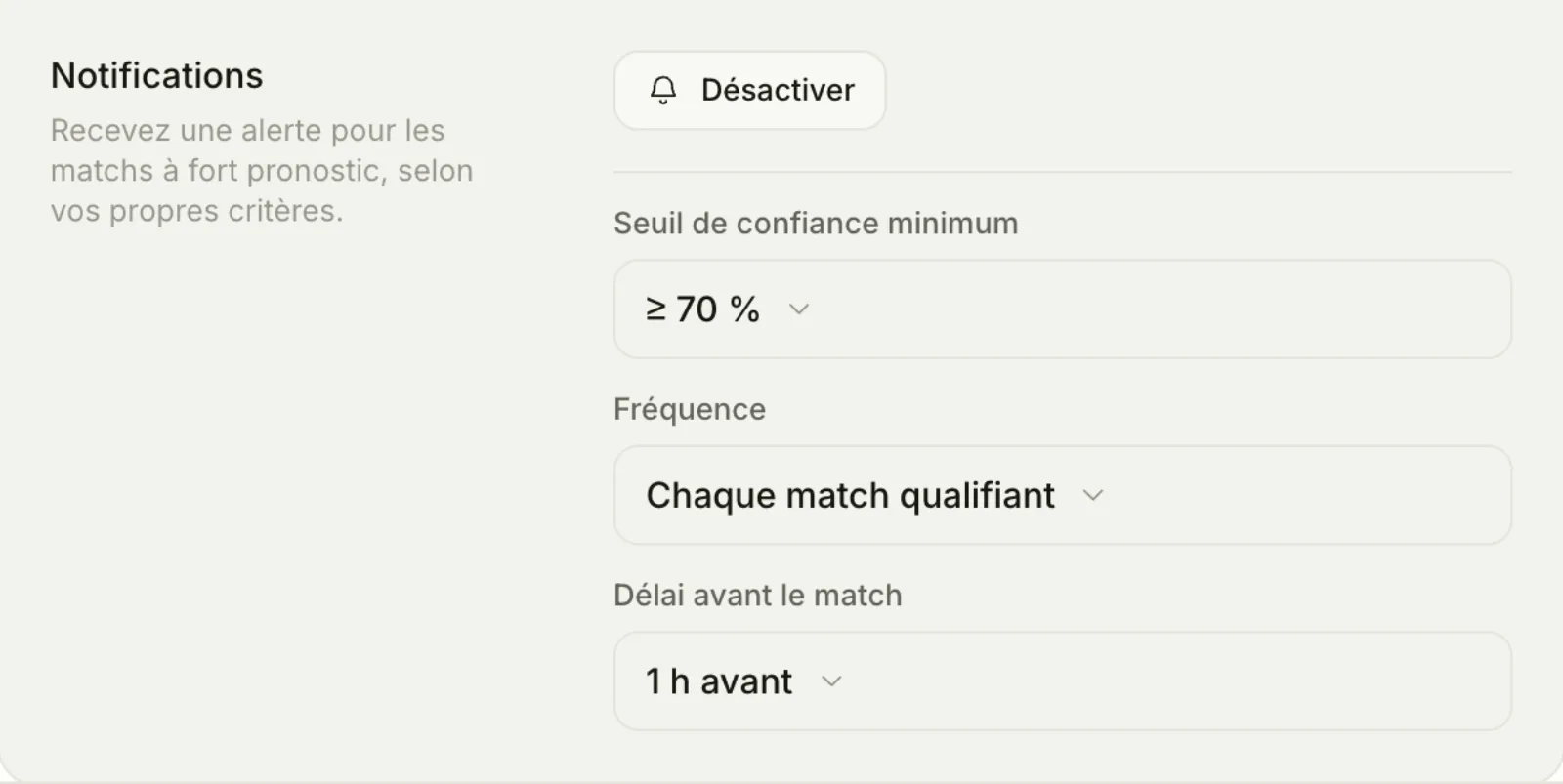
- Minimum confidence: 50, 60, 70, 80 or 90%. Default when you enable them: 70%.
- Frequency: “Every qualifying match”, “1 match in 2”, “1 match in 3” or “Daily digest”.
- Lead time before the match: 30 min, 1 h, 2 h or 3 h before (hidden for the daily digest).
The daily digest is a single notification per day, listing up to five of the day’s matches that reach the threshold. An alert is sent at most once per match. They come through the browser’s or the installed app’s notifications, with no email, and are set per device: repeat the setup on each phone or computer. Since the check runs every fifteen minutes, an alert can arrive a little after the targeted time. If permission is denied, allow notifications for pronocast.com in your browser settings.
Tournaments and draws
“Tournaments” lists the ongoing tournaments, meaning those with at least one match today or live. They are ordered by prestige (Grand Slam, then Masters, then the rest), those with a live match first. A “Search a tournament…” field filters the list.
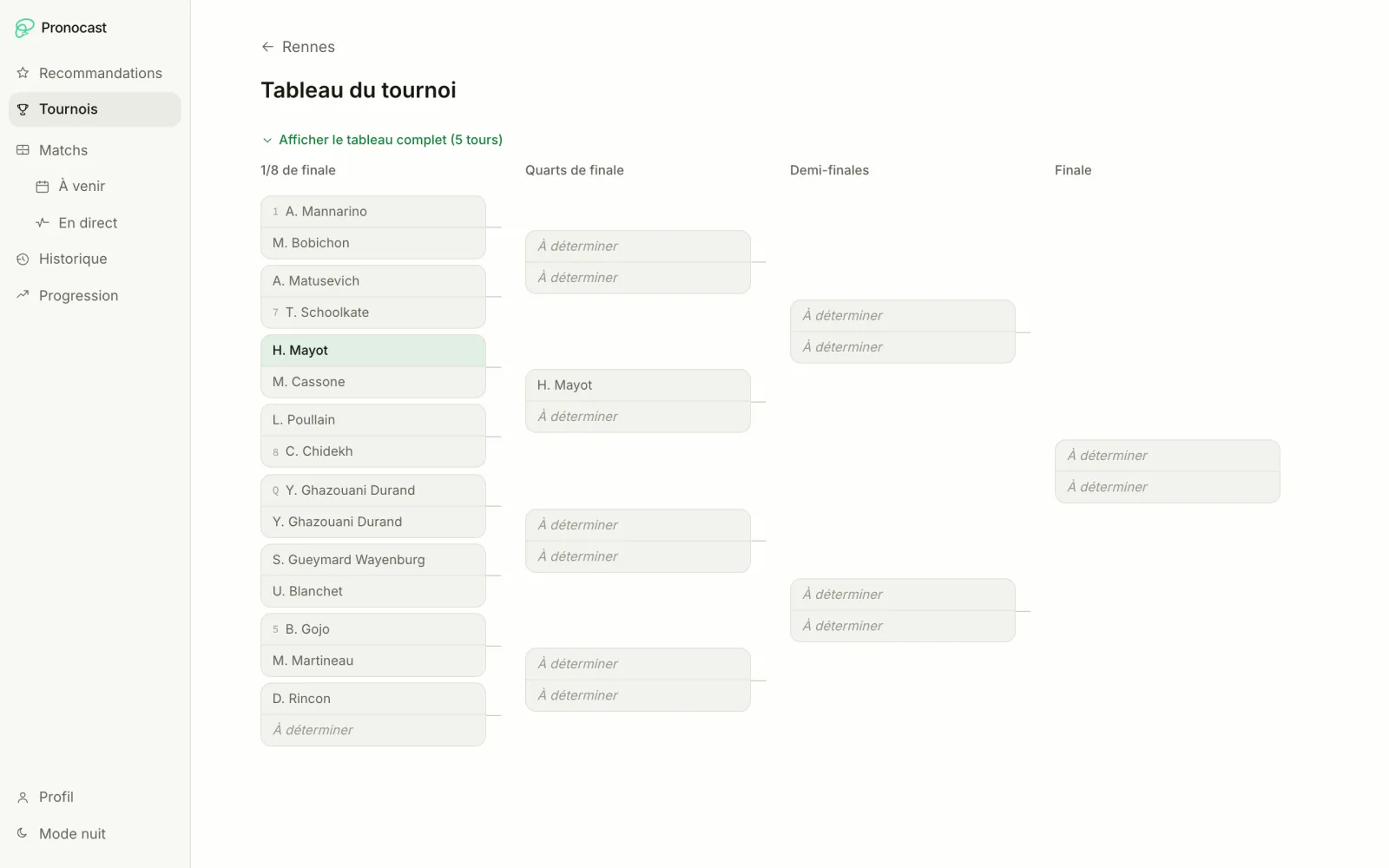
A tournament page separates “Live”, “Upcoming” and “Finished”, with the model’s accuracy on that tournament (for example “72% correct predictions (18/25)”, walkovers excluded). The “View the draw” button opens the bracket: seeds, real results, the winner highlighted, “To be determined” for matches still to come, and qualifying on its own. The bracket shows the draw, not probabilities: the predictions are on the tournament page.
History and Analysis
History and Analysis let you check the model yourself, day by day and by segment. That is what sets a prediction published before the match apart from a claimed figure.
History
The “Model accuracy” card (Singles or Doubles switch) gives the share of correct winners and correct set scores over the whole published history. Below it, a seven-day strip shows each day’s success rate, and the table details each match: prediction, sets, result (correct, missed or walkover). The table shows at most 500 rows.
Analysis
Four cards sum up the overall accuracy in singles and doubles, the days tracked and the best day (computed from five matches). The “Evolution” curve follows accuracy over time. The interactive tool combines Tour (Singles or Doubles), Gender and Surface to show:
- the selection’s accuracy;
- the “Accuracy by confidence level” (bands from 50-59% up to ≥ 90%), which answers the question “does the model deliver what it announces?”: the higher the announced probability, the higher the success rate should be;
- the “Best tournaments” and the “Tournaments to watch”, notably below the selection’s average.
A percentage only appears from 5 results; below that, the tool shows “Not enough results” rather than a misleading figure.
Player profile
The player profile gathers a singles player’s career and their matches covered by Pronocast. You open it from a match’s detail view with “See the player’s career”. It shows the record since 2020, recent form (last ten matches), the global and per-surface Elo, the correct predictions on their matches, their upcoming and live matches, win rates by season and surface, their titles, recent matches and most frequent opponents. There is no profile for a doubles player.
Profile and ideas box
Profile manages the account: email address, password, notifications, language and, on mobile, the theme, installation and the ideas box. Changing your email asks for the current password and a confirmation on the old and the new address. A Google account has neither a password nor an email you can change here. “Delete my account” permanently erases the account and its data: you must type SUPPRIMER and enter your password (except for a Google account).
The ideas box (“Suggest an idea” in the menu, “Feature requests” when opened) lets you suggest an improvement of 3 to 120 characters, with optional details, vote for other people’s and sort them by category (Idea, Improvement, Integration, Bug). Each member can post 20 ideas at most. Statuses are Planned, In progress, Done and Declined, and neither your name nor your email is shown.
Getting the most out of Pronocast
The best way to use Pronocast is as an information dashboard: it helps you understand a match, it does not decide for you. Seven habits:
- Read the probability, not only the favourite. 55% and 85% are nothing alike: the first is an open match, the second a clear favourite.
- Keep the missed predictions in mind. A 70% favourite loses three matches in ten, a 90% favourite one in ten. No percentage is a certainty.
- Check on Analysis. Filter on the tour and surface you follow and look at the accuracy by confidence level before trusting a threshold.
- Judge over weeks, not over a day. A good or bad day owes as much to the calendar as to the model.
- Save your filters and set one as default: you save time on every visit.
- Let alerts do the work. A 70 to 80% threshold and a 1 h lead time save you refreshing the page all day.
- Read the context. A match’s detail view shows form, fatigue and head-to-head: see what fatigue really changes and what the surface changes.
What Pronocast does not do
- Pronocast takes no bets and is not tied to any betting operator. It gives no betting advice.
- The model does not claim to beat the betting market: it honestly shows what it can do, and publishes its misses.
- ITF matches are not predicted (their results only feed the Elo ratings). Doubles matches have neither odds nor a player profile.
- A probability is a statistical estimate. Past accuracy does not guarantee future results.
- There is no email notification: alerts come through the browser or the installed app.
Gambling carries risks: debt, isolation, addiction. For help, call 09 74 75 13 13 (Joueurs Info Service, a French helpline, not charged at premium rate). Gambling is forbidden to minors. Our betting guide explains the risks of poor bankroll management.
Data, accuracy and freshness
The data comes from api-tennis.com (schedules, results, live scores, odds) and is recomputed several times a day. Every morning at 8 a.m. (Paris time), the pipeline updates the matches, the odds and the model; the predictions for today and tomorrow are published every 15 minutes; results are closed every 15 minutes and live scores updated every minute.
In testing, the model picks the right winner 69.1% of the time across 37,104 ATP, WTA and Challenger singles matches from 2025 to 2026 that it had never seen: that is the validation measure, not a success counter on published predictions. On matches announced at 70% confidence or more, accuracy exceeds 80%. The model is trained on more than 100,000 singles matches since 2020, and player state (Elo, form, fatigue, head-to-head) is computed on nearly 300,000 matches. The detail of the criteria and the validation is in the tennis prediction algorithm page and in the methodology. For the real figures on published predictions, see the verified results.